
01 //Training course
Advance Excel
- Track
- Data & Analytics
- Duration
- 30 Days
02 //Why this course
Why this course.
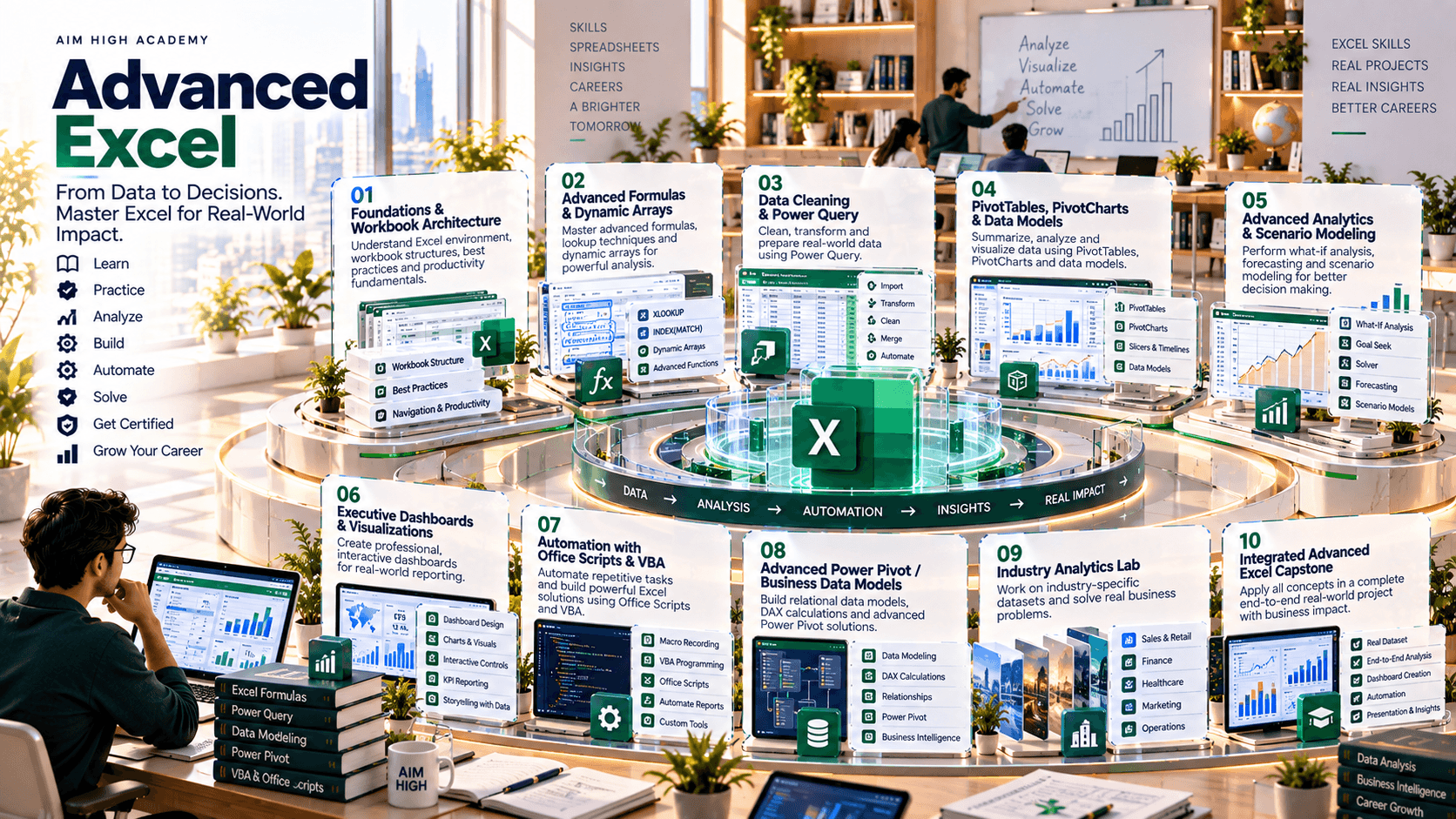
This 30-day Advanced Excel program is designed around the modern business spreadsheet workflow: structure messy data → build robust formulas → transform and combine datasets → analyze with PivotTables and statistical tools → create management dashboards → automate repeatable tasks → validate and communicate decisions. It is intended to move beyond basic spreadsheet operation into professional analytical practice.
Advanced Excel — Formulas, Power Query, PivotTables, Dashboards, Data Analysis & Automation
Build robust workbooks instead of fragile formula sheets.
03 //Curriculum
Course phases.
04 //Technology stack
The tools you'll work with.
Core spreadsheet
Advanced formulas, tables, analysis and reporting
Microsoft Excel for Microsoft 365
Data transformation
Import, clean, combine and refresh datasets
Power Query
Data modeling
Relationships, measures and larger analytical models
Power Pivot / Excel Data Model
Analysis
Summarization, scenarios and decision support
PivotTables, PivotCharts, What-If Analysis
Modern formulas
Dynamic, maintainable analytical formulas where supported
XLOOKUP, FILTER, UNIQUE, SORT, LET and related functions
Automation
Repeatable workflow automation
Office Scripts; VBA for desktop scenarios
Visualization
Executive dashboards and analytical storytelling
Excel charts, KPI cards, conditional formatting, slicers
External sources
Real-world data ingestion
CSV, Excel, folders, databases and web/API connectors where available
Documentation
Auditability and handoff
Excel documentation sheet, data dictionary, change log
05 //Projects and practice
Learning by doing.
- 01
Advanced Formula Engine
Build a reusable sales/operations workbook using modern lookups, conditional aggregation, dynamic arrays and robust error handling.
- 02
Power Query Data Pipeline
Combine multiple monthly source files, clean and standardize them, and produce a one-click refreshable dataset.
- 03
Pivot & Analytical Model
Build a multi-dimensional PivotTable/PivotChart analysis with slicers, calculated metrics and business KPIs.
- 04
Executive Dashboard
Create an interactive management dashboard with KPI hierarchy, trend analysis, exception highlighting and narrative insights.
- 05
Scenario & Decision Model
Build a budget/pricing/capacity model using What-If Analysis, Goal Seek and sensitivity concepts.
- 06
Automation Capstone
Automate a repetitive reporting workflow using Office Scripts or VBA and document controls, assumptions and maintenance requirements.
06 //Capstone
Capstone options.
- 01
Sales Intelligence Workbook
revenue, targets, conversion, product and regional performance.
- 02
Financial Planning Model
budget, actuals, variance, scenarios and management dashboard.
- 03
HR Analytics Workbook
headcount, attrition, hiring pipeline and workforce KPIs.
- 04
Operations Dashboard
inventory, productivity, SLA and exception monitoring.
- 05
Marketing Performance Model
campaigns, leads, conversions and channel KPIs.
07 //Assessment
How progress is checked.
- Advanced formulas
- Power Query
- Pivot/Data Model
- Scenario analysis
- Executive dashboard
- Automation
- Integrated capstone
08 //Learning journey
From foundation to capability.
How learning builds through a course. It describes the approach, not a promised outcome.
Foundation to capability
How learning builds
Stage 01
Foundation
The core concepts, vocabulary and tools the rest of the course builds on.
Stage 02
Practice
Guided exercises that turn concepts into working skills.
Stage 03
Application
Applying those skills to realistic problems and project work.
Stage 04
Capability
Using what you've learned with growing independence and judgement.
09 //Questions
Frequently asked questions.
Start learning
Ready to start learning?
Ask about training to talk through where this course fits your goals.