
02 //Why this course
Why this course.
This 30-day program is designed to build strong C programming fundamentals through progressively deeper work with syntax, control flow, functions, arrays, strings, pointers, dynamic memory, structures, file handling, modular programming, debugging and data structures. The sequence intentionally emphasizes memory-aware programming and problem solving rather than treating C as only a syntax course.
The ISO C standard defines the language and library model, while current cppreference documentation provides a practical reference for C language features and standard-library facilities. The C programming model includes objects, storage duration, pointers, arrays, functions, structures, enumerations, preprocessing and standard I/O; these areas form the backbone of the proposed program.
The GNU C Library documentation also provides extensive reference material for streams, files, memory allocation and POSIX/Linux-oriented programming; these are appropriate extensions for an applied C track, while platform-specific APIs should be clearly separated from ISO C.
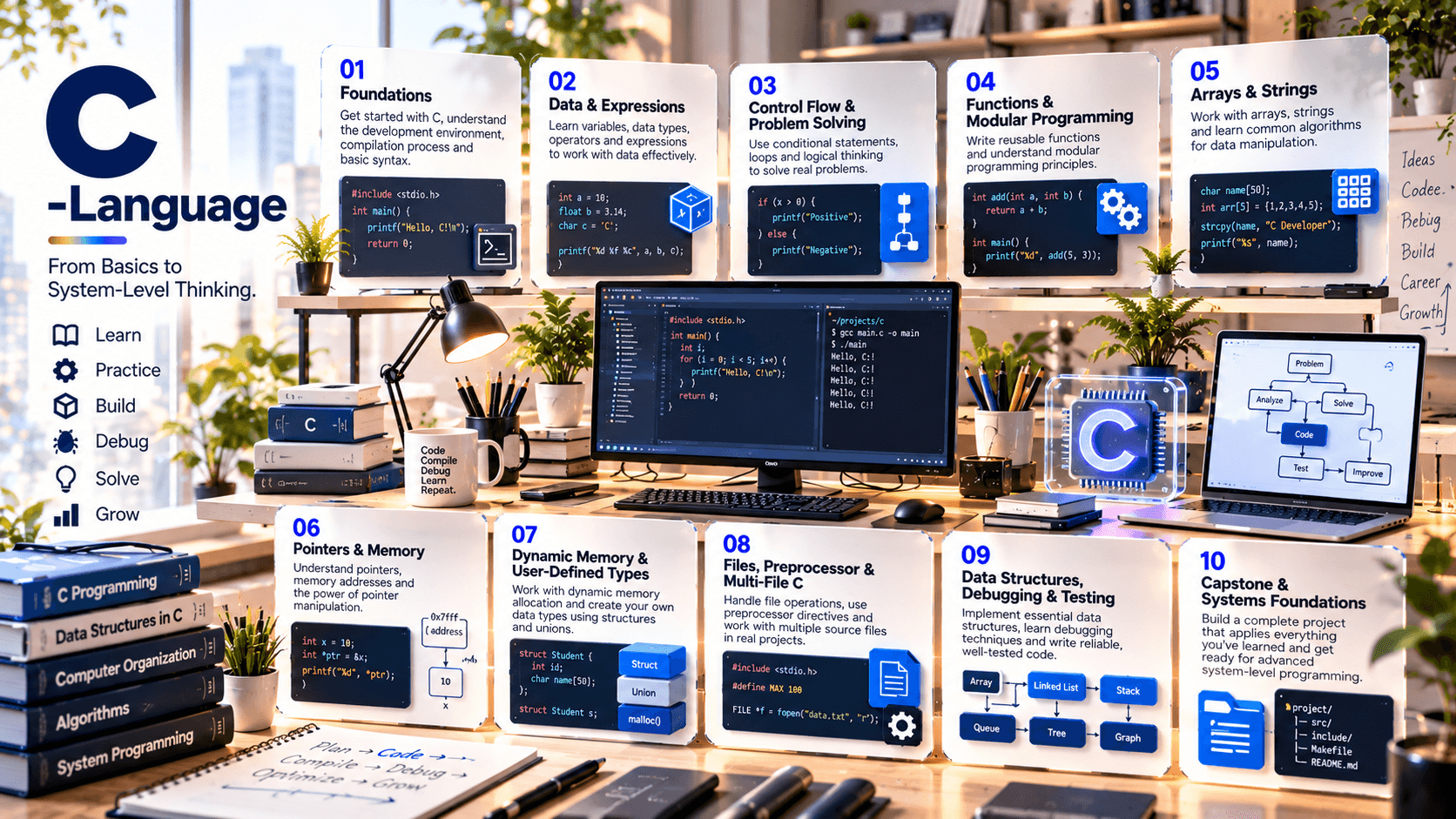
03 //Curriculum
Course phases.
04 //Technology stack
The tools you'll work with.
Tools
C17 as the primary teaching baseline, with selected awareness of newer C standards where the approved toolchain supports them
GCC or Clang compiler toolchain
Visual Studio Code or another C-capable IDE/editor
Make / CMake concepts for build automation
GDB or an equivalent debugger
Git / GitHub for source control and portfolio work
Linux/WSL or another Unix-like development environment for systems-oriented practice
AddressSanitizer / UndefinedBehaviorSanitizer where supported
Valgrind as an optional memory-analysis tool on supported environments
Standard C library: stdio, stdlib, string, stdint, stdbool, assert, time and related facilities
Notes
ISO C and platform/POSIX APIs are treated separately, so platform-specific interfaces are identified as extensions rather than core language features.
05 //Projects and practice
Learning by doing.
- 01
Console Problem-Solving Lab
Build a collection of validated programs covering arithmetic, conditions, loops, patterns and algorithmic problem solving.
- 02
Student / Employee Record Manager
Use arrays, structures, functions and file persistence to create a searchable record-management application.
- 03
Text Processing Utility
Read text files, count characters/words/lines, search patterns and produce summary reports.
- 04
Dynamic Memory Lab
Implement dynamically sized collections and demonstrate allocation, resizing, cleanup and failure handling.
- 05
Data Structures Toolkit
Implement linked lists, stacks, queues and selected searching/sorting algorithms from scratch.
- 06
Multi-File CLI Application
Separate headers, source modules and reusable utilities; create a repeatable build process.
- 07
Debugging & Memory Forensics Lab
Diagnose controlled segmentation faults, leaks, invalid accesses and undefined-behavior scenarios using compiler/debugging tools.
- 08
Integrated C Capstone
Build a modular command-line application combining structures, pointers, dynamic memory, files, validation, testing and documentation.
06 //Capstone
Capstone options.
- 01
Library Management System
members, books, borrowing/returns, search and persistent storage.
- 02
Inventory Management CLI
products, quantities, transactions, file storage and reports.
- 03
Banking Simulation
accounts, deposits, withdrawals, transaction history and validation.
- 04
Student Information System
student records, marks, search, sorting and file persistence.
- 05
Log Analyzer
parse text logs, categorize events, count patterns and generate summaries.
- 06
Mini Shell / Command Interpreter
optional advanced project using platform-specific APIs and clearly labeled systems programming extensions.
07 //Assessment
How progress is checked.
- C fundamentals & syntax
- Control flow & problem solving
- Functions / modular programming
- Arrays & strings
- Pointers & memory labs
- Structures / files / data structures
- Debugging & testing
- Integrated capstone
- Code documentation / presentation
08 //Learning journey
From foundation to capability.
How learning builds through a course. It describes the approach, not a promised outcome.
Foundation to capability
How learning builds
Stage 01
Foundation
The core concepts, vocabulary and tools the rest of the course builds on.
Stage 02
Practice
Guided exercises that turn concepts into working skills.
Stage 03
Application
Applying those skills to realistic problems and project work.
Stage 04
Capability
Using what you've learned with growing independence and judgement.
09 //Questions
Frequently asked questions.
Start learning
Ready to start learning?
Ask about training to talk through where this course fits your goals.