02 //Why this course
Why this course.
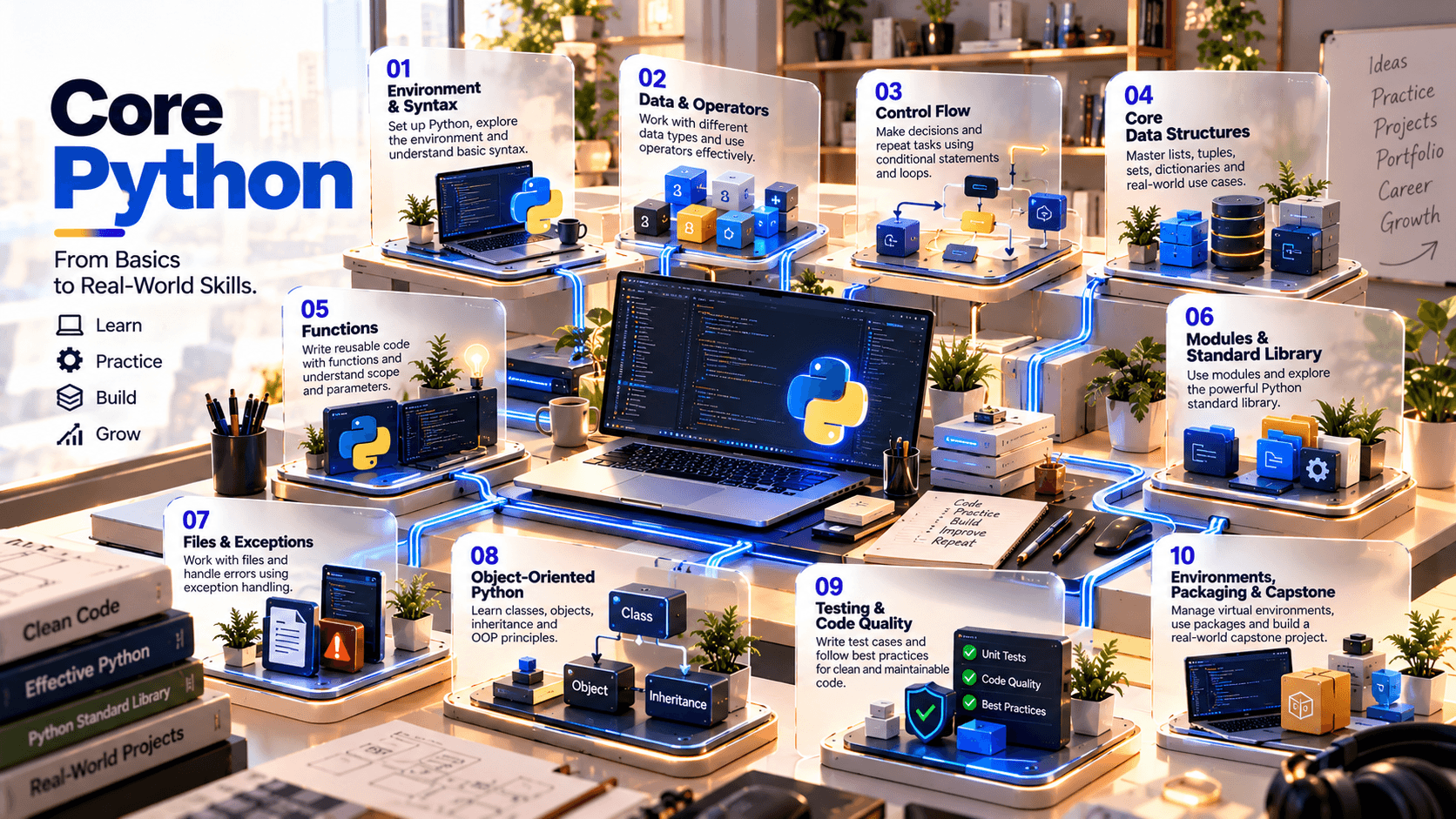
This 30-day program is designed as a focused foundation in Python programming rather than a full-stack specialization. The curriculum moves from interpreter usage and core syntax into control flow, Python's built-in data structures, functions, modules and packages, file handling, exceptions, object-oriented programming, testing, virtual environments and modern project packaging. The sequence is intentionally compact so learners finish with the ability to structure and ship a small, maintainable Python application.
The official Python tutorial describes the language fundamentals needed to read and write Python modules and programs, while the Python Packaging User Guide documents modern virtual-environment, dependency and project-packaging workflows. Python's `venv` module provides isolated environments, and modern packaging uses project metadata such as `pyproject.toml`.
03 //Curriculum
Course phases.
04 //Technology stack
The tools you'll work with.
Tools
VS Code or another Python-capable IDE/editor
Python interpreter and command-line workflow
pip for package installation
`venv` for isolated project environments
Standard library modules such as pathlib, json, csv, datetime and collections
pytest and/or unittest for testing
Git / GitHub for version control and portfolio delivery
`pyproject.toml` and a modern Python build backend for packaging practice
Ruff/Black or equivalent code-quality tooling, subject to the final lab setupOptional
05 //Projects and practice
Learning by doing.
- 01
CLI Expense Tracker
Build a command-line application using functions, data structures, file persistence, validation and exception handling.
- 02
Student / Employee Record Manager
Create a structured application using dictionaries/lists first, then refactor the domain model with classes and reusable modules.
- 03
File & Data Processing Utility
Read CSV/JSON/text inputs, validate records, transform data and generate a clean output report.
- 04
API-Ready Utility Foundation
Build a modular Python application designed so a future web/API layer can be added without rewriting the core logic.
- 05
Testing & Quality Lab
Write tests for core business logic, reproduce failures, fix defects and refactor safely.
- 06
Packaged Python Project
Turn a completed application into a clean project structure with metadata, README, dependencies, tests and build-ready packaging.
06 //Capstone
Capstone options.
- 01
Personal Finance Manager
transactions, categories, summaries, persistent storage, validation and tests.
- 02
Inventory Management CLI
products, stock movements, search/filtering, file persistence, exception handling and OOP.
- 03
Task & Productivity Manager
users/tasks, priorities, dates, status workflows, modular architecture and testing.
- 04
Student Management System
records, marks/grades, reports, file persistence, OOP and test coverage.
- 05
Python Automation Toolkit
a collection of reusable utilities for files, data transformation, reporting and command-line operations.
07 //Assessment
How progress is checked.
- Python concepts & quizzes
- Daily coding/problem-solving labs
- Functions, data structures & modules
- Files, exceptions & OOP
- Testing, debugging & code quality
- Packaging/environment exercise
- Integrated capstone
- Technical demonstration & documentation
08 //Learning journey
From foundation to capability.
How learning builds through a course. It describes the approach, not a promised outcome.
Foundation to capability
How learning builds
Stage 01
Foundation
The core concepts, vocabulary and tools the rest of the course builds on.
Stage 02
Practice
Guided exercises that turn concepts into working skills.
Stage 03
Application
Applying those skills to realistic problems and project work.
Stage 04
Capability
Using what you've learned with growing independence and judgement.
09 //Questions
Frequently asked questions.
Start learning
Ready to start learning?
Ask about training to talk through where this course fits your goals.