
01 //Training course
MS Office
- Track
- Business & Productivity
- Duration
- 30 Days
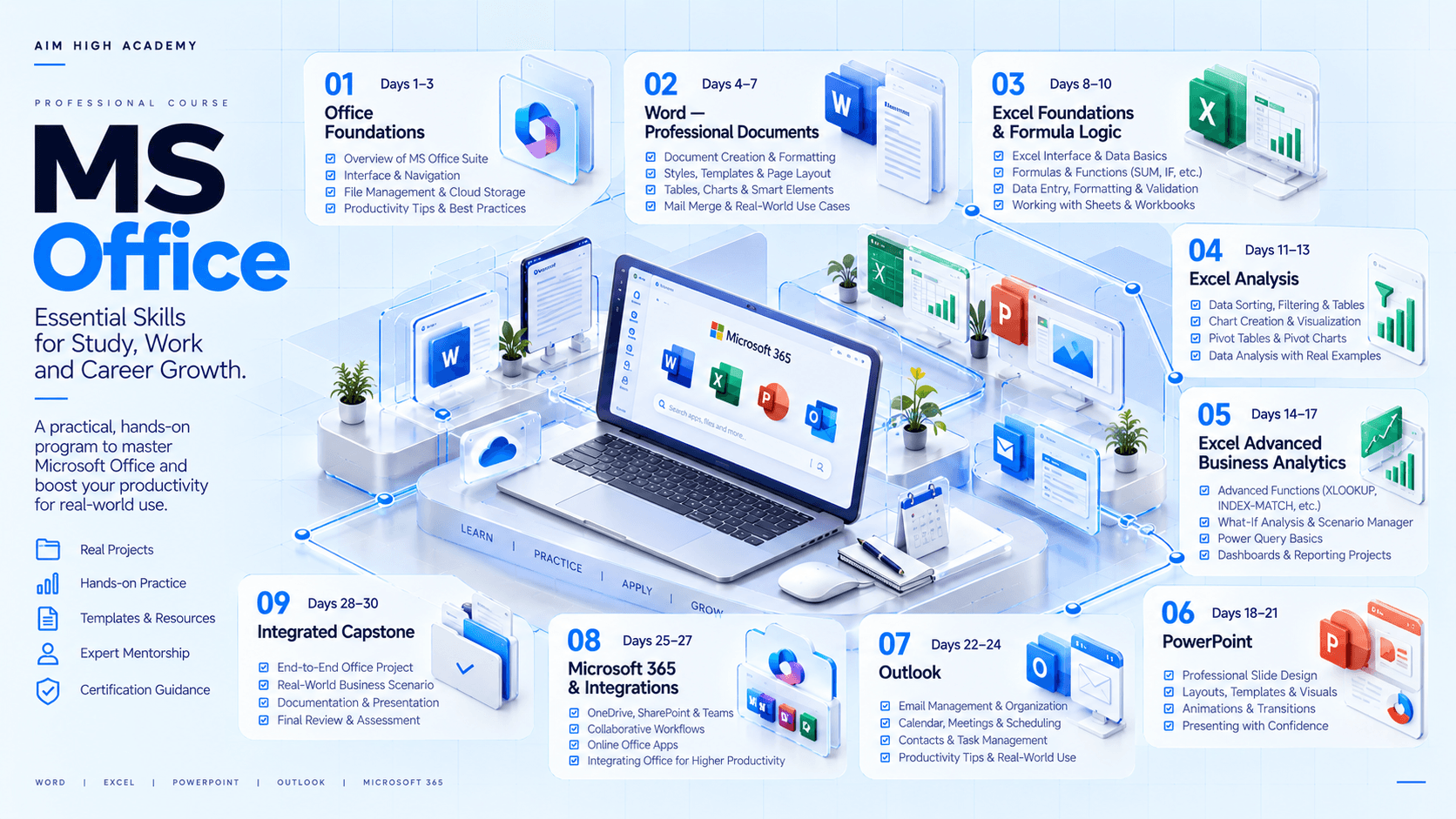
02 //Curriculum
Course phases.
03 //Technology stack
The tools you'll work with.
Tools
Microsoft 365 desktop/web applications where available
Microsoft Word
Microsoft Excel
Microsoft PowerPoint
Microsoft Outlook
OneDrive / SharePoint concepts for cloud file management and collaboration
Microsoft Teams as an optional integrated communication/collaboration environment
Microsoft Forms as an optional data-collection input for Excel exercises
PDF export and document-sharing workflows
Sample business datasets for Excel analysis
Notes
Exact capabilities vary by Microsoft 365 subscription, desktop/web version, organization policy and platform. The final course website should identify the supported environment before promising specific buttons or features.
04 //Projects and practice
Learning by doing.
- 01
Professional Business Document
Create a polished multi-page business report using styles, headings, tables, images, references, headers/footers and a generated table of contents.
- 02
Excel Business Tracker
Build a structured operational workbook with formulas, validation, conditional formatting, lookups and summary KPIs.
- 03
Excel Management Dashboard
Transform a fictional dataset into PivotTables, charts, slicers and an executive dashboard.
- 04
Executive PowerPoint Deck
Convert business findings into a concise management presentation with narrative flow, visual hierarchy and speaker notes.
- 05
Outlook Productivity System
Organize an inbox, create rules/categories, schedule meetings, prepare agendas and establish a professional follow-up workflow.
- 06
Integrated Office Workflow
Take one business case from raw data → Excel analysis → Word report → PowerPoint presentation → Outlook stakeholder communication.
- 07
Office Productivity Audit
Review a deliberately inefficient Office workflow and redesign its file structure, templates, spreadsheet logic, reporting process and communication flow.
05 //Capstone
Capstone options.
- 01
Sales Performance Review
analyze sales data, create a management report, build a presentation and prepare stakeholder communication.
- 02
HR Monthly Review
analyze employee/attendance data, produce a Word report, executive deck and meeting schedule.
- 03
Finance / Operations Pack
create an Excel KPI dashboard, management memo and leadership presentation.
- 04
Marketing Campaign Review
analyze campaign data, create insights report, presentation and action-plan communication.
- 05
Small Business Management Pack
combine customer, sales, expenses and operations data into a complete Office-based reporting system.
06 //Assessment
How progress is checked.
- Office fundamentals & workflow
- Word document project
- Excel formulas & spreadsheet modeling
- Excel analytics / dashboard project
- PowerPoint executive presentation
- Outlook productivity workflow
- Integrated Office capstone
- File organization / professional standards
07 //Learning journey
From foundation to capability.
How learning builds through a course. It describes the approach, not a promised outcome.
Foundation to capability
How learning builds
Stage 01
Foundation
The core concepts, vocabulary and tools the rest of the course builds on.
Stage 02
Practice
Guided exercises that turn concepts into working skills.
Stage 03
Application
Applying those skills to realistic problems and project work.
Stage 04
Capability
Using what you've learned with growing independence and judgement.
08 //Questions
Frequently asked questions.
Start learning
Ready to start learning?
Ask about training to talk through where this course fits your goals.